🍁 Built in Canada. Built for Nonprofits.
Events Get Messy. Your Platform Shouldn't.
Registration, check-in, receipting, and follow-up — calm under pressure.
Manage nonprofit events with registrations, ticketing, custom questions, reminders, check-in, attendance, and follow-up in one system built for real operational work.
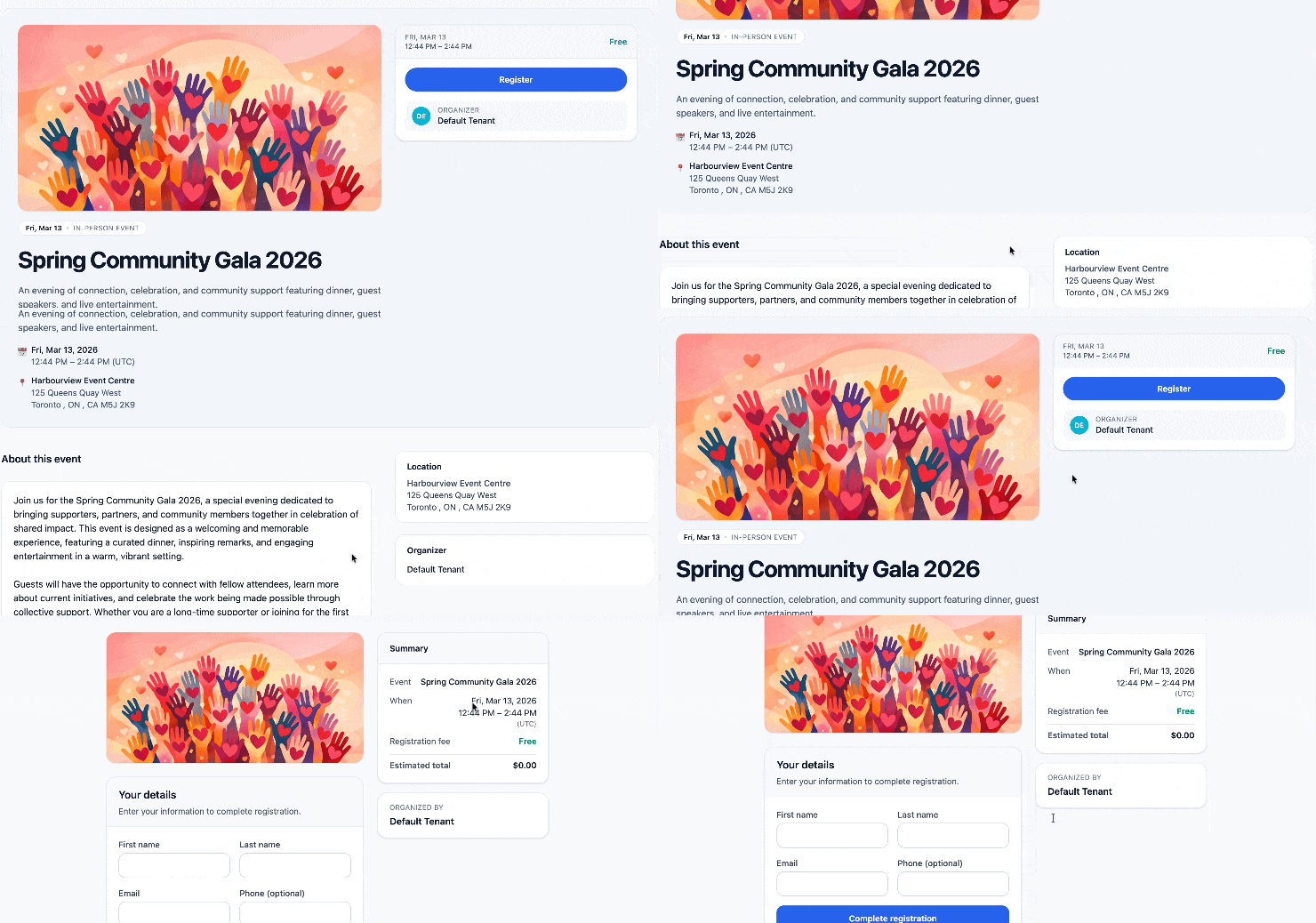
Run events from a system
that stays calm when event day gets messy.
Events do not fail because teams lack features. They fail because the basics break under pressure: capacity, guests, compliance, receipts, and day-of check-in. Altrinum keeps the core workflow calm, predictable, and reportable.
Support event types, hosts, tags, delivery modes, public or password-protected pages, and event communications in one system built for nonprofit operations, fundraising, and follow-up.
Capacity controls and waitlists that match real workflows, including sold-out handling
RSVP, paid, or ticketed events with taxes, discount codes, and fair market value built into receipting
On-site readiness with QR scanning (beta), manual check-in, Avery badge printing, resend confirmations, and event-day reporting
Privacy and compliance controls including password-protected pages, hidden venues, and conditional registration questions
Built for event-day control
Keep the operational basics under control with registrations, guest handling, sold-out logic, manual attendance, QR scanning (beta), badge printing, and the data event managers need at the top.
Built for nonprofit event complexity
Support event types, hosts, tags, in-person or virtual delivery, taxes, discount codes, fair market value, ticket windows, donations in registration, and stronger receipting workflows.
Built for reporting and follow-up
Track registrations, attendance, no-shows, discount code usage, source codes, and event outcomes while supporting confirmations, reminders, broadcasts, and surveys before or after the event.
Comparison
How Altrinum compares
If your team is evaluating event tools, the practical difference is this: Altrinum helps you manage nonprofit events as operational workflows, not just registration pages.
| What matters | Altrinum | Typical event tool | Generic form stack |
|---|---|---|---|
| Best fit | Nonprofits that want event registration, operations, receipting, attendance, and communications to work together with fundraising and reporting. | Teams that mainly need event publishing and basic registration collection. | Teams piecing together forms, spreadsheets, payments, and manual follow-up. |
| Registration handling | Supports RSVP, paid, and ticketed events with guests, guest limits, guest-specific questions, taxes, discount codes, fair market value, donations in registration, and nonprofit event workflows. | Often strong for basic ticketing, but less connected to nonprofit operating and receipting context. | Usually requires heavy manual setup and downstream reconciliation. |
| Operational fit | Built for capacity, sold-out handling, waitlists, confirmations, reminders, QR scanning (beta), manual check-in, badges, event-day visibility, and follow-up. | May handle registration well but often needs extra tools for communications, attendance, privacy controls, or reporting. | Relies on separate tools and staff workarounds for most event operations. |
| Privacy and compliance controls | Supports public, hidden, and password-protected events, hidden venue details, conditional questions, and communications that share venue or login details only with confirmed guests when needed. | May support some privacy options, but often with less flexibility for nonprofit communication workflows. | Usually leaves teams to manage privacy and communication details manually. |
| Reporting and follow-up | Event data can stay tied to attendance, no-shows, discount usage, source codes, donations, surveys, and broader nonprofit reporting instead of becoming another disconnected export. | Often creates another silo that staff must sync or export from. | Usually produces fragmented records and inconsistent reporting. |
What you get
Purpose-built nonprofit event features
A purpose-built event system that supports calm registration flows on the front end and cleaner attendance, receipting, communications, and reporting on the back end.
RSVP, paid, and ticketed events
Support simple RSVP events, paid registrations, and ticketed events with date-based ticket windows for use cases like early bird pricing.
Capacity, waitlists, and sold-out handling
Manage capacity with waitlisting options that can be enabled, manual, or used for paid events while keeping sold-out handling practical for staff.
Guests and guest-specific questions
Support guests, guest limits, and guest-specific questions so registrations reflect how real nonprofit events are actually managed.
Custom and conditional questions
Create flexible event questions, push tenant-wide questions into events, and use conditional logic to ask only what matters.
Privacy, delivery, and communication controls
Manage public, hidden, or password-protected events, choose in-person or virtual delivery, and control whether venue or login details appear publicly or only in guest communications.
Receipting, taxes, and fair market value
Handle taxes where collected and support event receipting with fair market value considerations for paid nonprofit events.
Discount codes and reporting
Use discount codes in event sales and report on their usage so teams can understand uptake and campaign performance.
Check-in, badges, and attendance
Support QR scanning (beta), easy manual attendance, Avery-compatible badge printing, resend confirmations, and event-day visibility for staff.
Emails, surveys, donations, and source tracking
Schedule confirmations and reminders, send urgent broadcast emails, configure surveys before or after the event for attendees or no-shows, enable donations in registration, and track source codes.
Switch with less friction
Moving off Eventbrite or a spreadsheet-heavy workflow?
The hardest part is rarely creating the next event. It is preserving registration logic, ticketing rules, guest handling, communications, and attendance workflows without creating more manual cleanup.
- • Set up event types, registration flows, guest rules, and question logic
- • Bring tickets, discount codes, donations, and event receipting into a cleaner workflow
- • Support check-in, badges, attendance, surveys, and urgent communications in one system
- • Reduce spreadsheet reconciliation and disconnected reporting over time
Why operational fit matters
Good events need more than registrations
Nonprofit events depend on cleaner registration data, smoother check-in, reliable attendance capture, better privacy controls, and follow-up that stays connected to fundraising and the rest of your organization’s work.
Altrinum is designed for teams that want event operations to feel less fragmented and more accountable from setup through post-event reporting.
FAQ
Questions teams ask before they switch event platforms
Altrinum supports RSVP, paid, and ticketed nonprofit event workflows, including guest-based registrations, event types, hosts, tags, delivery options, custom questions, attendance tracking, and event-related receipting.
Yes. Altrinum supports event taxes where needed, discount codes, ticket structures, and fair market value considerations for event receipting and paid nonprofit event workflows.
Yes. Altrinum supports rigorous waitlisting options, including workflows that can be enabled, managed manually, and used with paid events, along with more practical sold-out handling.
Yes. Events can be public, hidden, or password protected, and teams can choose whether to show venue details publicly or only share venue or virtual login details with confirmed guests through communications.
Yes. Altrinum supports QR scanning (beta), easy manual attendance workflows, and Avery-compatible badge printing so teams can manage on-site operations more smoothly.
Yes. Event admins can configure custom questions, tenant admins can create reusable questions that can be pushed to events, and conditional logic can be used to ask more relevant questions only when needed.
Yes. Teams can schedule confirmation and reminder emails in advance, set up surveys relative to the event date for attendees or no-shows, enable donations in registration, and send urgent event broadcast emails when needed.
Yes. Migration can start with event setup patterns, ticketing structure, guest and question rules, confirmation workflows, and the operational friction your team wants to remove first.
Ready to run nonprofit events from a platform built for real operational work?
See how Altrinum can support registrations, ticketing, discounts, check-in, attendance, receipting, and follow-up in one system designed for nonprofit events and fundraising.
Proudly built in Canada.